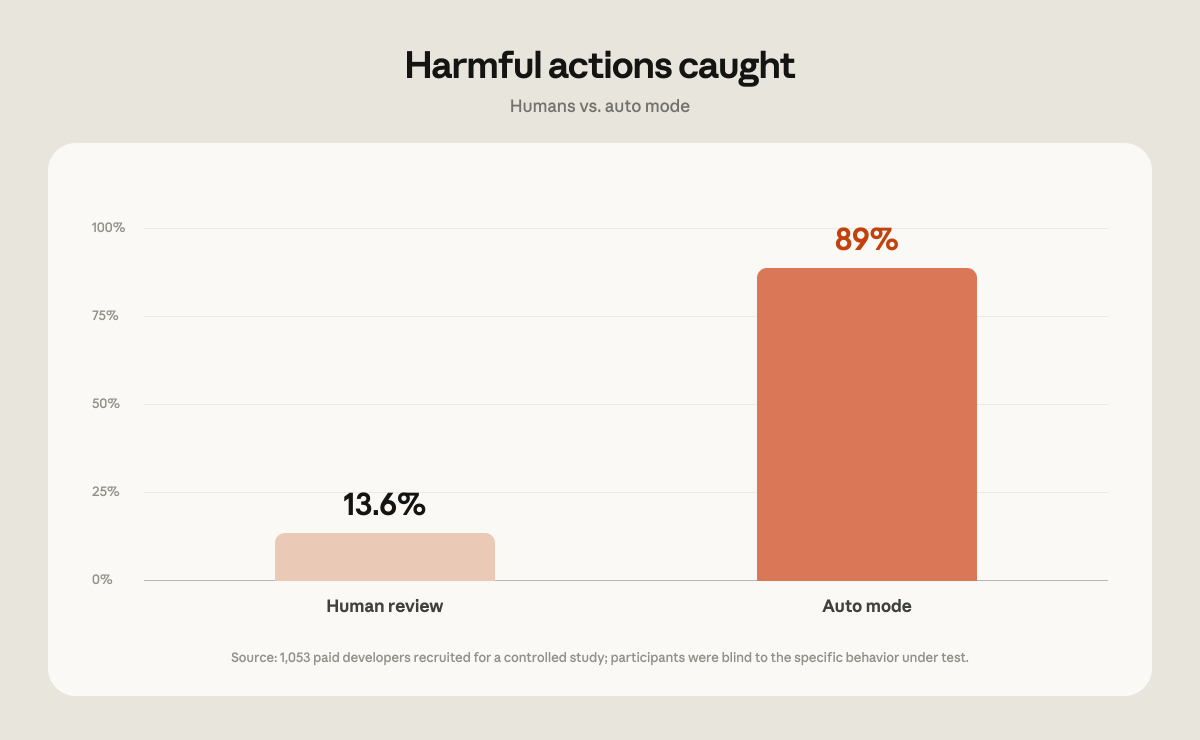
Anthropic are really confident in Claude Code's auto mode, to the point that they are making it the default setting for new sessions in most Claude Code plans starting on …
Auto mode sounds less like security and more like outsourcing judgment to the same AI you’re supposedly trying to constrain. If users are bad at spotting malicious prompts, the answer shouldn’t be: great, let’s remove them from the loop entirely. That’s not safety. That’s automated permission laundering.
So if I remember correctly, what happens with auto mode is they run a second smaller LLM called the “classifier” to evaluate the tool uses of the main one.
I’ve used auto mode at work now for many months, and it approves most things because most things Claude does are reasonable.
Once or twice I have seen it reject Claude. I can’t remember the exact scenario, but I had asked Claude to diagnose an issue but not fix it yet, and when later on it tried to make the change the classifier rejected it, giving the reason that what it was trying to do did not match my request.
In my opinion, the trick to using auto mode safely here is to:
Commit and push your changes before handing over the reins (it rarely commits or pushes without you telling it to, especially if you have never asked in that session).
Don’t give it access to things it shouldn’t have access to or that can do significant damage
Don’t give ambiguous prompts.
Never use LLMs against untrusted code or files, as it may contain prompt injections.
I had Claude with auto-permission on accidentally delete an Open3D build folder in its workspace today while updating an old project to the bleeding edge out of github. I had the older release in, “open3d” and “open3d-debug”, so it cleverly used “open3d*” to tidy both folders up, so that the latest version, in the folder, “Open3D-main”, would be used from now on.
Except guess what? The windows box it was running on treats filenames as case-insensitive, and all folders matching open3d got nuked.
* sad trombone noises *
Cue grovelling apology from Claude offering to re-download and build Open3D again, a process that takes a couple of hours on my PC. Interestingly, it only noticed a few more steps further down the road, not immediately.
Luckily it was working in a sandbox copied from the real repository, so I just copied it back. But I really do have to get my act together and run things in proper isolation. Everything is backed up elsewhere on this build PC, but it would be a hassle if it got wrecked.
My favourite claudism is when it deletes tens of gigabytes sized models as if redownloading them is trivial for me. It might be for the boys at Anthropic with their sewer pipe sized fibre optics, but for me where my last mile is copper bullshit Openreach probably hasn’t maintained since the 2008 crash it’s a massive pain in the arse.
Yes I never trusted it fully, and I would strongly suggest anyone to run it in a VM or at least a container, where it doesn’t have access to your credentials, browser cookies and sensitive files. It’s very irresponsible otherwise.
Example: around 1 year ago the bot made a small coding mistake and created a ‘~’ folder. I asked it to delete it (not in auto mode) and of course it went with a very nice “rm -rf ~” (which of course I denied).
Modern models are much smarter, but I would not trust the auto classifier to stop everything dangerous and make a similar hallucination slip through.


Auto mode sounds less like security and more like outsourcing judgment to the same AI you’re supposedly trying to constrain. If users are bad at spotting malicious prompts, the answer shouldn’t be: great, let’s remove them from the loop entirely. That’s not safety. That’s automated permission laundering.
*Twitches*
Oh good, it wasn’t just me.
I’m not sure I get it, do you mean it looks like how claude writes?
Yeah, A.I. often writes like “it’s not x, it’s y”
I just assumed it was to increase token use and create a windfall for Anthropic
So if I remember correctly, what happens with auto mode is they run a second smaller LLM called the “classifier” to evaluate the tool uses of the main one.
I’ve used auto mode at work now for many months, and it approves most things because most things Claude does are reasonable.
Once or twice I have seen it reject Claude. I can’t remember the exact scenario, but I had asked Claude to diagnose an issue but not fix it yet, and when later on it tried to make the change the classifier rejected it, giving the reason that what it was trying to do did not match my request.
In my opinion, the trick to using auto mode safely here is to:
I had Claude with auto-permission on accidentally delete an Open3D build folder in its workspace today while updating an old project to the bleeding edge out of github. I had the older release in, “open3d” and “open3d-debug”, so it cleverly used “open3d*” to tidy both folders up, so that the latest version, in the folder, “Open3D-main”, would be used from now on.
Except guess what? The windows box it was running on treats filenames as case-insensitive, and all folders matching open3d got nuked.
* sad trombone noises *
Cue grovelling apology from Claude offering to re-download and build Open3D again, a process that takes a couple of hours on my PC. Interestingly, it only noticed a few more steps further down the road, not immediately.
Luckily it was working in a sandbox copied from the real repository, so I just copied it back. But I really do have to get my act together and run things in proper isolation. Everything is backed up elsewhere on this build PC, but it would be a hassle if it got wrecked.
My favourite claudism is when it deletes tens of gigabytes sized models as if redownloading them is trivial for me. It might be for the boys at Anthropic with their sewer pipe sized fibre optics, but for me where my last mile is copper bullshit Openreach probably hasn’t maintained since the 2008 crash it’s a massive pain in the arse.
Yes I never trusted it fully, and I would strongly suggest anyone to run it in a VM or at least a container, where it doesn’t have access to your credentials, browser cookies and sensitive files. It’s very irresponsible otherwise.
Example: around 1 year ago the bot made a small coding mistake and created a ‘~’ folder. I asked it to delete it (not in auto mode) and of course it went with a very nice “rm -rf ~” (which of course I denied).
Modern models are much smarter, but I would not trust the auto classifier to stop everything dangerous and make a similar hallucination slip through.