

Today I made a new Template for our Go-Away anti-bot protection and am up-streaming the solution so that all of lemmy admins can have a drop in replacement.
When I was creating it I made it for us and by default it looks like this: (The Reddthat one has our icon instead ofcourse)

I named the template reddthat-challenge.gohtml and when I was making it more ‘generic’ I deleted reddthat and typed lemmy.
Turns out I typed lemmmy instead! It’s technically valid, ansible-lint and ansible-playbook --syntax-check both pass without issue!
--- a/templates/docker-compose.yml
+++ b/templates/docker-compose.yml
@@ -170,7 +170,7 @@ services:
     volumes:
       - "goaway_cache_main:/cache"
       - "./policy.yml:/policy.yml:ro"
-      - "./lemmmy-challenge.gohtml:/lemmy-challenge.gohtml:ro"
+      - "./lemmy-challenge.gohtml:/lemmy-challenge.gohtml:ro"
     environment:
       GOAWAY_CLIENT_IP_HEADER: "X-Real-Ip"
Our monitoring was/is were all returning success?!?
This is a screenshot from https://status.reddthat.com/:

(This service is Betterstack)
It was setup to only alert when “the url becomes unavailable” (which is any code outside than 2XX). Previously Cloudflare used to pass through the error code? As this has always alerted me whenever the backend failed?)

Here is a memory graph you can see the red ‘swap’ be basically static until I tested the template and then the swap came back up again and then at 10:53 (00:53 UTC) it was restarted and never came back!
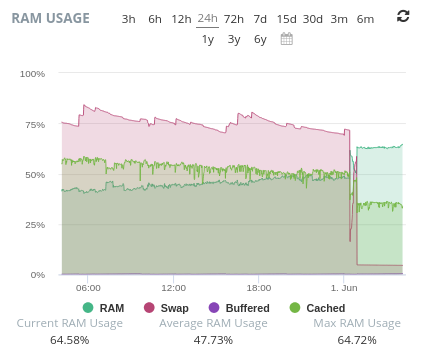
(This service is hetrixtools)
And here is my own on-site monitoring service showing all green!

(This is uptime-kuma. (Note: This goes directly to the box and not via cloudflare))
I can probably dig deeper into the logs but as I went out to lunch and my commit at 10:52 coincides with the exact ‘increase’/lack of increase seen above we can be certain it’s related!
A 3 hour outage and I didn’t know about it because all 3 uptime monitoring solutions all agreed we were online!
Resolution:
I’m so sorry!
Turns out uptimekuma which is my fallback for the online serivces was setup to monitor the PORT only directly on the box. So as our webserver was still running as far as it was concerned, it was technically “online”.
- I’ve added a few more checks to uptime-kuma so instead of just being a port check, there is a HTTPS check with keyword. So the page has to load, and the keyword needs to be on the page otherwise I’ll get notified.
- I’ve updated Betterstack to check only a 200 HTTP code. Which is what Hetrixtools was already set too.
- I’ve updated Hetrixtools to also check for “Reddthat” in the page.
- Hetrixtools also can monitor the docker service, so if the docker service goes down I get a message now.
- I’m thinking about adding a way to punch into the box from uptimekuma too and monitor the docker container itself, as Hetrixtools doesnt seem to do that, but that might be overkill? Or not? This will probably be the only way in which I can tell?
Even after 15 years (oof now I feel old) doing “IT” I am still amazing at how no matter how many systems you put in place to try and catch issues, assumptions and unfortunate circumstances can rear its ugly head.
Cheers,
Tiff
Thx 4 all the work!👍
🙏