

0·
13 days agopoop gems
At least they’re pretty.

I like computers, trains, space, radio-related everything and a bunch of other tech related stuff. User of GNU+Linux.
I am also dumb and worthless.
My laptop is ThinkPad L390y running Arch.
I own RTL-SDRv3 and RSP1 clone.
SDF Unix shell username: user224
poop gems
At least they’re pretty.

They signed up for the job knowing what it entails.
Doesn’t mean it’s fine.
Based on current events, for police it will heavily depend on circumstances.
But what’s the beef with firemen?
You don’t need OR in a list.
ra[cp]ist

We’re so cooked

But that bear looks so pettable 🥺

This seems like it’s for sharing same keyboard and mouse between multiple computers. What I am looking for is for the secondary laptop just to act as a monitor. That’s it. It could just be a video stream of a virtual monitor.
What I mean is the mouse cursor isn’t there when I move it over there. Well, isn’t visible. It still interacts with objects.
Same as this person’s issue: https://discuss.kde.org/t/show-cursor-on-virtual-display-kde-connect-krdc/43421
please take a look and tell me what you think
Sorry if it seems like I do, but I in fact do not have a brain.
I just found this tool gets the job done, and that’s it.
I typically just use it in a pretty stupid manual way.
local$ waypipe -c zstd=6 ssh username@IP
remote$ export DISPLAY=:90
remote$ ./xwayland-satellite :90 &
remote$ xfce4-panel
Even the xfce4-panel discovery was an accident.
I was using waypipe before knowing about xwayland-satellite. I wanted to run an X program, so in the same shell I typed vncserver to, well, launch a VNC server. That invoked xfce4-session, BUT since the WAYLAND_DISPLAY was set, XFCE DE attached to waypipe rather than XTigerVNC, launching a full remote desktop over my local one.
And out of that, xfce4-panel proves pretty useful. I can easily launch other programs using GUI, and also see widgets on that panel.
Here’s what I mean, if that sounds confusing:
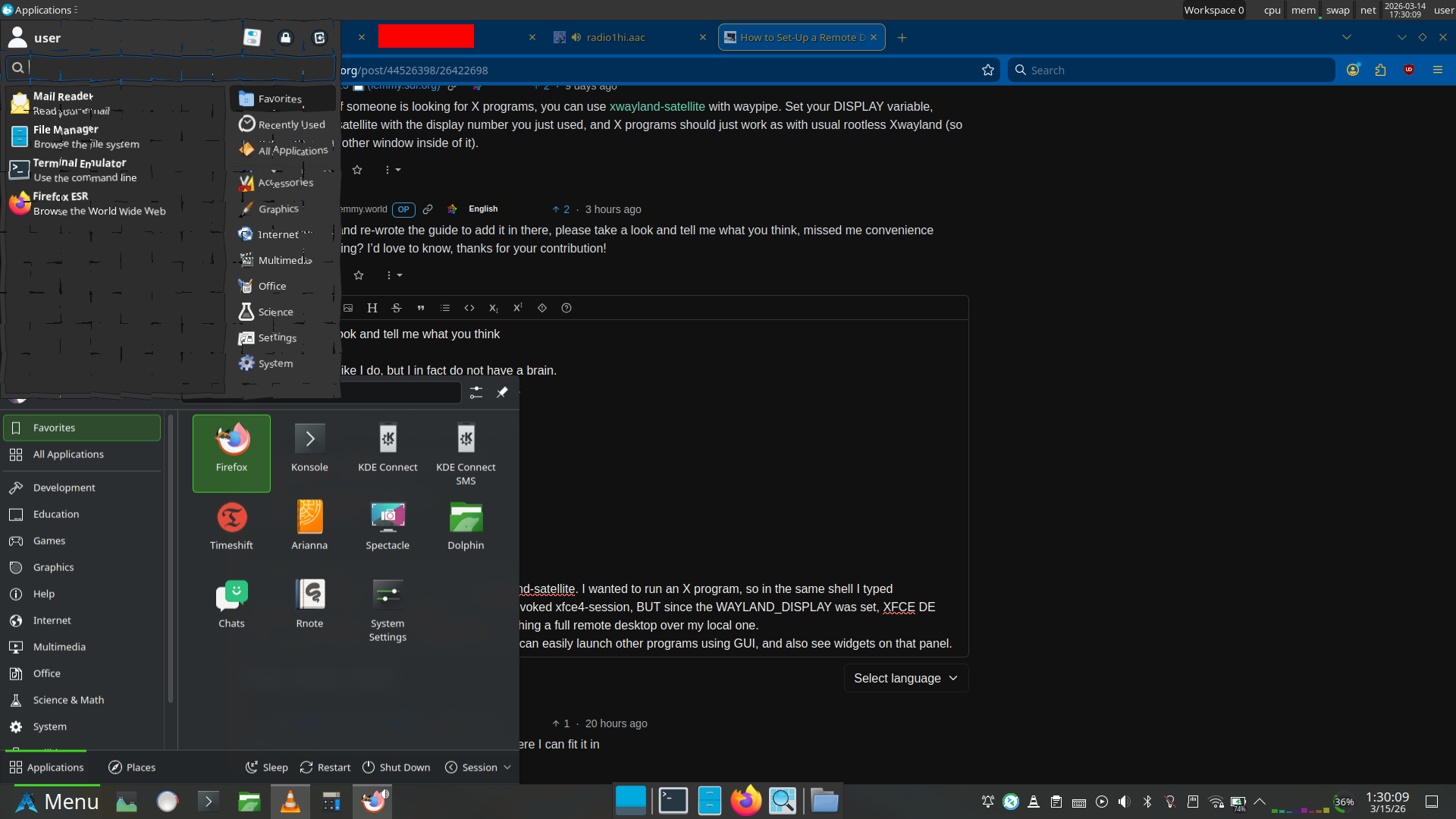
Plasma panel (bottom) is local, XFCE panel (top and middle bottom) are remote.
Right, and you’re probably wondering why that app launcher at the top looks shattered. Well, both can’t be opened at once. If the application launcher goes out of focus, it closes.
But also, I use the shatter effect in KDE Plasma, so it doesn’t go away immediately. This is just as close as I could get with screenshot timing.
Just a quick note if someone is looking for X programs, you can use xwayland-satellite with waypipe. Set your DISPLAY variable, launch xwayland-satellite with the display number you just used, and X programs should just work as with usual rootless Xwayland (so no window with another window inside of it).

I recently tried Ubuntu.
Wait, no, I fought Ubuntu.
Firefox was snap. OK, remove it and apt install. Nope, that installs a snap. Now, one more thing, for some reason uninstalling the snap version of Firefox took several minutes each time where it was “disconnecting” it from a bunch of things, or something along those lines.
So I followed the Mozilla guide for Firefox installation on Ubuntu. Did it work? No. The higher priority setting for Mozilla repo from their guide didn’t work.
Finally, I found the answer on OMG Ubuntu, and I could finally install the regular Firefox package.
Same, but also for TrackPoint. I have the touchpad disabled. I don’t need to move my hand away from keyboard, I can endlessly scroll through pages at varying speeds just by finger pressure, and even cooler, I can scroll sideways just as easily. Oh, and I can also scroll both vertically and horizontally combined, to just easily navigate in the 2D space, pretty cool.
Although I also use the touchscreen a lot. I don’t want a regular laptop anymore. Unfortunately the 360 ThinkPads seem a bit rare when trying to find a used one.
Let me check what I could get if I tried to buy it new.
ThinkPad L13. Intel Core Ultra 5 125U, 16GB LPDDR5, 512GB SSD, 1920x1200 IPS, WiFi 6E, plastic body. €1,398.76 with 3% student discount. That seems overpriced, at the very least for my use case.





Looks like window reflection.