
Lan over power lines sometimes works in these cases
Those will jam radio reception for your whole neighborhood. They should be illegal.
if you have electricity in the shed, but you can’t run an ethernet cable, you can use ethernet over the powerline, it is a bit less reliable than a network cable, but it is way better than wifi. i used it extensively when i was renting. the “worst” part was that they would fall out of sync occasionally (1-2x/year)
Another potential fix, just get a better router or dedicated hot spot. Repeaters can sometimes be flaky.
Yeah i read they can be flaky.
Not really any way to determine this on paper, really. Other than ‘it depends’.
Depends on what materials the walls are made of, the model of your wifi router, the orientation of your router’s antenna(s), the orientation of your laptop or phone or whatever’s antenna, what obstacles or vegetation might be between the two buildings, what other devices nearby might be producing interference, whether or not Mercury is in retrograde, etc. In an edge case, even the daily humidity or precipitation may make the difference between a usable or unusable signal.
As others have said, the best way to test would be to just stand with your phone at the location where you’d put the repeater and see if your phone gets a strong wifi signal there. If it does, a repeater will probably work.
However, a repeater isn’t the only solution that could work here. Other potentially good solutions:
-
Run an ethernet cable from the house to the office. (Faster, more reliable, but would require running wires.)
-
Use a network over power lines setup, to have wired network without needing to run any new wires. (Still faster than wifi; might not be quite as reliable as other setups, though.)
-
Use a directional wifi antenna to extend the range of your router. If you point it at the office, that will probably extend the range more than enough to reach it. (A directional antenna will be more reliable than a repeater, and for a comparable price. Also will save a little electricity, since you don’t have to power the repeater.) If you want to be really cheap and creative, you can make a directional antenna – that can actually be a lot more effective and reliable than it looks, and can be done at basically no cost.
-
Have you tried simply using it without any upgrades? It’s only 70ft away, and wifi can definitely reach that far if conditions are good. Maybe try moving your wifi router closer to a window or exterior wall. If your router has movable antennas, make sure they’re positioned vertically for best signal distance. If you have a lot of neighbors, go into your router’s configuration and experiment with changing the wifi channel. If I remember right, there are 11 different channels, and if you’re on the same channel as a different nearby network, the two will interfere with each other and have greatly reduced range … but if you have it on a different channel, that will avoid interference and improve range.
Thanks for your detailed answer. There’s only one wall between the office door and the router, the wall is a typical 2x6 with insulation and sheathing and all that, and the signal there is weak to medium. But once inside the office we can add two more walls impeding the signal and it’s gone. Inside the shed the signal is good so I’m guessing the extender would work, if only having to pass one wall. Otherwise it all comes down to Mercury’s retrograde.
Seriously, though, maybe try this solution first:
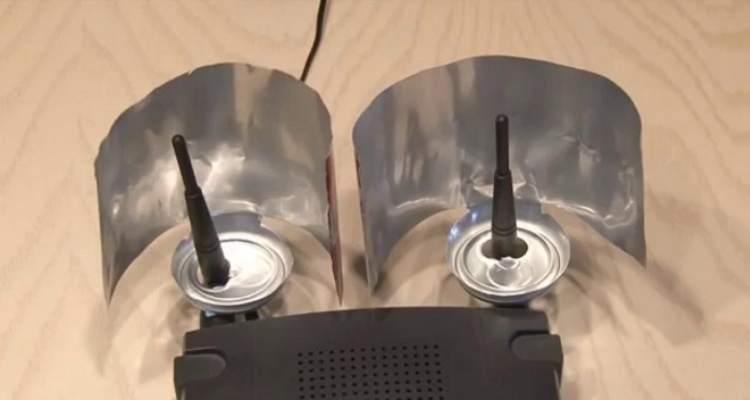
As stupid as that looks, it’s very possible that it would be more than enough to get your wifi signal where it needs to go, at basically zero cost and zero energy usage.
Brilliant! But alas my router doesn’t have antennas like that. I can try a curved sheet of aluminum and put it behind, maybe it will work, worth a try! Thanks.
-
Go stand with your phone where you’d expect to place the extender.
If it gets a strong signal, you are probably fine.
Literally nothing else helps. That distance could be void or filled with lead blocks.
It’s good, not excellent, does it mean with the extender the signal in the office will be good or just weak?
You can put your phone in hotspot mode and place it where the extender should go, then see how good the signal in the office is.
That’s a good idea but unfortunately i have terrible cell reception and my mobile is useless without wifi.
You can set up a mobile Hotspot without phone reception. The Hotspot won’t have any working internet connection, but you will still be able to judge the signal strength, and even measure the speed using iperf
So hotspot the wifi?
I can do that? I never tried, I assumed it wouldn’t make sense to hotspot wifi.
Probably a bit better than your phone, depending on models (phone, extender, router), of course. At least in theory repeaters can have better antennas and more power to spare.
If you can put a network cable though at least one of the walls you might as well just put an outdoor AP (main building) or WiFi bridge (shed) there. That way the signals only have to go through one wall.
I think it will partially depend on the model of extender you bought.
I would just get some direct burial ethernet cable, drill a couple of holes and install an access point in the office. WiFi repeaters can be unreliable, especially if there are already a lot of WiFi networks in your area.