I haven’t heard of that since the Vista days, totally forgot about it. Doesn’t make sense, I’ve been all-flash* (E is still HDD for backups, no programs) for well-over a decade. Maybe I should disable it and see if it makes a difference. C is a Samsung 960 Pro and D is a Western Digital Black SN750 in raid0, so it’s not really helping even if it is doing something…
My Linux system (which used to run Window so it has 32 GB of RAM), won’t even hit 8 GB if I’m not gaming. I’ve opened up multiple apps just to show how efficient it is. I think it was sitting around 4 GB before I started running things to see if I can make it balloon easily.
And I’m running most my apps as flatpaks which I’ve heard may add some slight overhead in terms of RAM usage - someone correct me if I’m wrong about this.
My work computer (granted it likely has tons of background security tools running) uses 10/16 GB’s just to get to the desktop and do nothing. The best part is, because ~1.2 GB’s of RAM gets allocated for the integrated graphics, I’m really only left with ~4.8 GB’s of RAM to do actual work. But wait, it gets even better! This week I found out some bullshit Copilot feature was enabled and taking up another ~1.2 GB’s of RAM, leaving me with a total of 3.6 GB’s of RAM. So I disabled the WSAIFabricSvc service and reclaimed a sliver of dignity and work space.
The number of people that still don’t understand this, even after it’s been discussed ad nauseum for decades is frightening.
Unused RAM is wasted RAM. You want it used. You want cached data there for instant access. What matters is how much is available for something else if you need it, and Windows does a shit job of getting that info across.
I’m pretty sure I have the pagefile disabled; both C and D are NVMe drives, and D is raid0. I disabled superfetch a few minutes ago, rebooted, and don’t see any performance impact, but the used memory when idle is now 10GB, vs the 19 in that screenshot. No other changes.
I could see the appeal if I was using a platter drive for my programs or frequent data, but it’s not 2008 anymore. I’d rather see actual usage over ‘the computer knows best’.
And CachyOS running KDE Plasma is the most RAM hungry setup. I took a Win 11 laptop with 8gb and threw Debian running Xfce and that’s using like 300mb of RAM lol
I guess going from 7-8 to 600-1.2k seemed like such an improvement I didn’t think to GO HARDER to 300. Though my Ubuntu server VMs get that I assume lol.
What? FF with a bunch of Jira tabs, Outlook, Teams, Excel, Miro, Spotify, and I am at 100% of 16 gigs. Not even saying anything about running a 8gig VM from time to time
Teams, Firefox, and Outlook and that’s most of my Windows work PC RAM gone. Have to close out of my dev work whenever a meeting is afoot because the calls fucking hammer this thing.
Windows doesn’t struggle with 16GB at all unless you’re doing something that obviously needs as much memory as you can give it, like anything made by Adobe.
For 9/10 users 16GB is plenty, even with common apps that hoard it like it’s some sort of hard drug (Chrome).
I’m sitting at 22 gigs used with a browser, teams, and an IDE. The browser is taking about 1.6, the IDE as well. Teams is taking 2. Then there’s a bunch of little web views and other BS that windows has spawned gobbling up it all.
Teams is the most performance inefficient shit I’ve ever been forced to use.
We use both Zoom and Teams for meeting with partners. On my piece of shit work laptop, I have no problem with Zoom. Teams on the other hand will randomly cut my audio, lag my cursor, or cause peripherals to stop working when I’m in a meeting. I simply can’t fathom how it’s as bad as it is.
When it’s being used, stuff gets slower - so yes, I technically use it as an indicator, by noticing that my machine is slow because it’s out of free ram


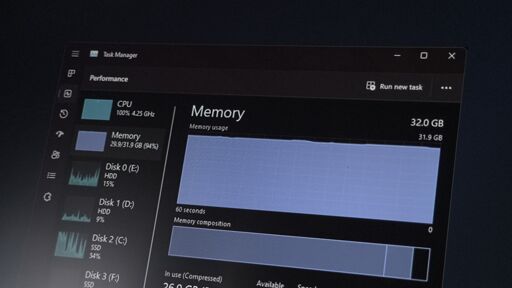
32? It takes a lot to not only use 16, but to actively use it and be affected by slower pagefile access.
Ehh, my main machine eats up 12-16GB with just background tasks, and that’s on W10. Nobody gives a fuck about optimization since the late 00s.
SysMain / Superfetch has altered your perception of how much RAM you actually use.
I haven’t heard of that since the Vista days, totally forgot about it. Doesn’t make sense, I’ve been all-flash* (E is still HDD for backups, no programs) for well-over a decade. Maybe I should disable it and see if it makes a difference. C is a Samsung 960 Pro and D is a Western Digital Black SN750 in raid0, so it’s not really helping even if it is doing something…
The alternative is your CPU spooling up and a longer delay launching applications.
In your screenshot, you already have 70% available memory. Are you on a quest to maximize idle ram? If so, why?
My Linux system (which used to run Window so it has 32 GB of RAM), won’t even hit 8 GB if I’m not gaming. I’ve opened up multiple apps just to show how efficient it is. I think it was sitting around 4 GB before I started running things to see if I can make it balloon easily.
And I’m running most my apps as flatpaks which I’ve heard may add some slight overhead in terms of RAM usage - someone correct me if I’m wrong about this.
My work computer (granted it likely has tons of background security tools running) uses 10/16 GB’s just to get to the desktop and do nothing. The best part is, because ~1.2 GB’s of RAM gets allocated for the integrated graphics, I’m really only left with ~4.8 GB’s of RAM to do actual work. But wait, it gets even better! This week I found out some bullshit Copilot feature was enabled and taking up another ~1.2 GB’s of RAM, leaving me with a total of 3.6 GB’s of RAM. So I disabled the
WSAIFabricSvcservice and reclaimed a sliver of dignity and work space.Ram usage isn’t important, it’s how much your page being hit. Otherwise you want your ram fully utilized.
The number of people that still don’t understand this, even after it’s been discussed ad nauseum for decades is frightening.
Unused RAM is wasted RAM. You want it used. You want cached data there for instant access. What matters is how much is available for something else if you need it, and Windows does a shit job of getting that info across.
I’m pretty sure I have the pagefile disabled; both C and D are NVMe drives, and D is raid0. I disabled superfetch a few minutes ago, rebooted, and don’t see any performance impact, but the used memory when idle is now 10GB, vs the 19 in that screenshot. No other changes.
I could see the appeal if I was using a platter drive for my programs or frequent data, but it’s not 2008 anymore. I’d rather see actual usage over ‘the computer knows best’.
E: me spell good
You shouldn’t disable page.
I don’t anticipate needing all 64 gigs at once, and afaik the only other reason is for bsod diagnostics. Unless there is something I am unaware of…?
Hibernate?
Damn bro, that’s brutal.
Also, Christ, how many apps do you have running in your tray?
Well, I’m installing Linux (CachyOS) on my former W10 PC this weekend. So, my 16gb of ram will be well utilized.
At least someone still cares about optimization.
And CachyOS running KDE Plasma is the most RAM hungry setup. I took a Win 11 laptop with 8gb and threw Debian running Xfce and that’s using like 300mb of RAM lol
I guess going from 7-8 to 600-1.2k seemed like such an improvement I didn’t think to GO HARDER to 300. Though my Ubuntu server VMs get that I assume lol.
What? FF with a bunch of Jira tabs, Outlook, Teams, Excel, Miro, Spotify, and I am at 100% of 16 gigs. Not even saying anything about running a 8gig VM from time to time
Discord, spotify, Firefox and minecraft (with Mods) is enough to bring down my 16 gbs
Teams, Firefox, and Outlook and that’s most of my Windows work PC RAM gone. Have to close out of my dev work whenever a meeting is afoot because the calls fucking hammer this thing.
That’s because Teams is a piece of shit, not because 16GB isn’t enough normally.
16gb will go far on MacOS and any Linux distro you throw at it. Windows 11 will struggle.
Windows doesn’t struggle with 16GB at all unless you’re doing something that obviously needs as much memory as you can give it, like anything made by Adobe.
For 9/10 users 16GB is plenty, even with common apps that hoard it like it’s some sort of hard drug (Chrome).
I’m sitting at 22 gigs used with a browser, teams, and an IDE. The browser is taking about 1.6, the IDE as well. Teams is taking 2. Then there’s a bunch of little web views and other BS that windows has spawned gobbling up it all.
Teams is the most performance inefficient shit I’ve ever been forced to use.
We use both Zoom and Teams for meeting with partners. On my piece of shit work laptop, I have no problem with Zoom. Teams on the other hand will randomly cut my audio, lag my cursor, or cause peripherals to stop working when I’m in a meeting. I simply can’t fathom how it’s as bad as it is.
How much is your page being used? That’s a more real indicator. You should want all of your ram to be used.
When it’s being used, stuff gets slower - so yes, I technically use it as an indicator, by noticing that my machine is slow because it’s out of free ram
No. No I can play games on Linux without capping my 16.