You must log in or register to comment.
Terminal gang!
It does everything you need with ONE exception I’ve found: if you use it for your file manager (I do) and you find that you need to quickly select a few items based on image preview, it is not great. Now you can solve this with vifm or something, or just launch dolphin or something every once in awhile.
Have you used a terminal file manager with image preview like yazi? Or just a thumbnail viewer like lsix?
I didn’t know a thumbnail viewer existed, I will have to try. Historically I have used sxiv in tabbed mode and just tried to remember filenames which is obnoxious.
I use the terminal for terminal shit. File manager is not terminal shit (for me).
You don’t have to touch the terminal. You just really, really should.
Look I just switched over from Windows, I’m new to this shit lol. I enjoy using commands while I’m learning them but mostly I just copy/paste from instruction manuals on how to install shit I want installed. Makes me feel like a master hacker.
It’s not a blank screen. It’s a canvas. You just don’t know how to paint.
I have too sneezed with a nosebleed, those are spurious allegations
the issue with the terminal is that you can easily fuck up really badly if you don’t know what you’re doing.
the following look the same to a new user:
rcifconfig -r 0 -f puny -l allrctrl -r all -i root -f(both are imaginary made-up comments sothat you cannot just say "oh well obviously one does this and the other one does that)
then one goes on to nuke your home directory while the other one restarts the wifi adapter.
(and this can actually happen in practice. consider all the “always remove the french language pack” jokes that has been going around for years.)
for graphical user interfaces, you typically have icons to help you give a sense of what it’s doing, typically warning signs before you do anything dangerous, etc.
I’ve heard the jokes about
rm -rf /. I’ve never met anybody who’s taken it seriously and nuked their system.That command is legendary. It’s one of the first bits of computer lore I ever learned, about 10 years before I ever touched Linux. In fact, at that time I knew two things about Linux: it’s a free OS and don’t do
rm -rf /.Of course you should do some research first, so that you’re sure that you know what a command does, but if you’re getting it from a forum like Stack Overflow or even reddit, you can be reasonably sure that if the commenter was trying to destroy your computer they’d get downvoted and one of the other commenters would warn you about it. Don’t treat Linux like it’s some kind of minefield that you have to tiptoe around. It isn’t conducive to learning.
I think the real issue with the modern terminal, and Linux in general, is that we are using tools designed for programmers and system admins, who are expected to know exactly what they are doing, to build and run servers and treating them like they are end user tools. My grandmother was perfectly happy using a terminal for the only computer she owned because the tools it provided were simple and had those built in protections in a way that bash never will be.
read the rfc. ‘claude, what does the rfc say?’ the what?
I think it’s just been stigmatized by society as a whole for some mysterious reason. Didn’t a lot of our grandmothers slashed through terminals like fruit ninjas back in the day?
Heck yeah they did! I remember going over to my grandmothers house to use Word on her computer running DOS. She used that computer to keep her personal budget, do the accounting for her office supply business, write letters, and the newsletters for her church and social clubs. No gui, just a command line and some things that we would now call a TUI.
Did AI write this? It has that weird detachment from understanding the meme format, what the people are saying, and the point of everything that LLMs tend to get just right.
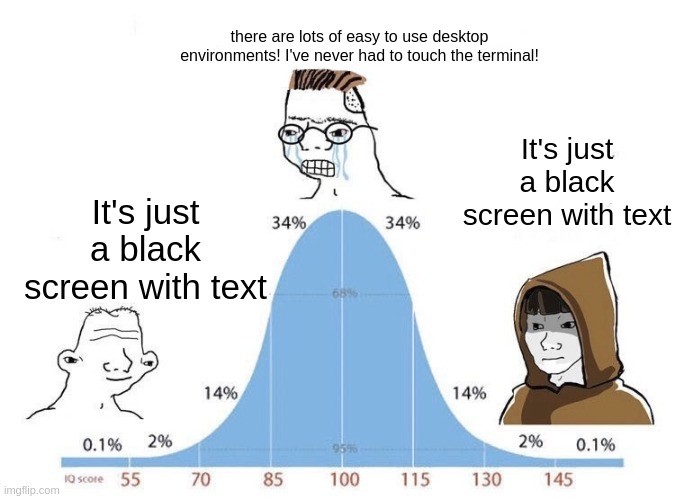
um, no. The joke is that a lot of people are scared of Linux because they think it’s “just a black screen with a bunch of text”, a lot of people who are newly using Mint or the other common “friendly” distros are proud and trying to convince everyone that you never need to touch the command line, and then the more people know what they’re doing the more likely they are to just live in a terminal and not bother with anything else.
This is one of those situations where I’d have to write an essay to dive into everything wrong. I’m not going to do all that just to have you say “nu uh”. Here’s one example:
The title is “I can’t use Linux! It’s too hard!” yet the crying bell curve person in the middle is literally using Linux.
Did you mean for the title to say “the terminal”? That would change things. But that’s sort of my point, everything has this one off LLM vibe.
People have been misusing this template for as long as I’ve seen it. I don’t know why, but I’ve seen people write different things for the first and last person. This one, at least, doesn’t have that. What are the othee one offs?
when people say to him “it’s not that deep!” this guy takes the diving orb to the trench
Yes, middle school level reading skills are super deep.
I’d like to meet a Linux user who’s never had to touch the terminal.
The middle peak of Linux users is definitely not using GUI only workflows lmao
GUI is simpler because you have to remember a sequence of steps for every action you want to take and then memorize a bunch of keyboard shortcuts and then do it all again when they reinvent their product in two weeks.
CLI requires you to learn how your system is structured and where things are located and then you create scripts that last years. Not everyone wants to put in a bunch of effort just to use their computer.
Anyways Firefox just updated and they moved “save to collection” and a few other things so now I need to relearn some stuff. I hope my other apps don’t reinvent themselves anytime soon. Every update I know how to use them less and less.
A regular user will never in a million years create a script.
How will they transfer their pirated media to their NAS? Manually? Every time?
With ai they can
And now they have bricked their computer.
i used AI last week to modify the characters that get produced when i type special key combinations on my keyboard. after looking with classical search engines (duckduckgo, google) for about 20 minutes and getting confused with not much of a clear answer, i asked chatgpt and got the task done in 15 minutes and learned a whole lot while doing it, because it also explained exactly why the files are the way they are.
Doesn’t matter, now that they can they will and AI won’t tell them no.
Oh no, I have to open a text file with a convenient list of all the settings for this application. How awful.
If it was convenient, every single GUI would just use that as a settings menu.
If it was up to me they would. Instead they have 14 layers of menus you have to click through to find what you’re looking for if they have it at all.
The only inconvenient part about using the terminal is knowing the command to get into the configuration files. Once you’ve done it a few times it’s simple. People just don’t want to do even the minor effort to learn that which is why these days we’re stuck with all these shit applications you can’t reconfigure at all.
Fuck Linux
All my homies use FreeDOS
Fuck FreeDOS
All my homies use Plan9
Fuck plan9
All my homies use EFI SHELL
Ok I was kidding I actually love my systemdOSd it runs seamlessly on my IBM systemdbookd so fuck FreeDOS and everything else cause they aren’t d
In defense of the creators of Unix, you cannot fuck plan9.
I have a pocket pussy that uses plan9 for its OS
Everything on Qubes
Fuck EFI SHELL.
All my Amish brothers and sisters use a Typewriter.
Not seen any black screen with text. I don’t think all distros have that. I expect non IT users never get to see that.
I… what are you talking about? Those words make sense on their own and I could probably diagram them as sentences, but put together in that way they don’t seem to parse into anything coherent.
Edit: Wait, are you saying that you think there are distros that don’t have a terminal or terminal emulator?!?
I feel like there are levels of Desktop customization all linux users go through. start out with something like cinnamon or KDE or GNOME and then you go down the rabbit hole of tiling WMs with rounded corners, neon borders, funny looking panels and then eventually you’re just set on using cagebreak or a very simple version of dwm/dwl with no panel at all. And once you discover vim style navigation it’s over. The mouse suddenly becomes a relic.
I mostly just stopped obsessively fiddling with the visuals, I honed in on a good setup, colorscheme etc. and just kept using that. My period of trying flashy stuff like window transparency was very short, it can look cool but most of that stuff is way too impractical.
the only visual thing I use is opacity on focus with DWM. I prefer it over having a coloured bar around the window.