As a big fan of the Steam Deck something I want to emphasize here is that even if you didn’t want both the joysticks and the touchpads on the Steam Controller and wish they had picked one or the other, this kind of setup means the controller has essentially the same layout as the Steam Deck which is HUGE for ease of finding custom control schemes already uploaded by the community for complex games.
I prefer joysticks+gyro over touchpads for aiming and so for me the touchpads might seem superfluous, but in reality I heavily use them for virtual menus in all of my control schemes I make for complex games with lots of controls and inputs. The nice thing is that even though I am in the minority of people in that I prefer joysticks + gyro over touchpad for aiming, because the Steam Deck and Steam Controller both have two touchpads and two joysticks, somebody who is touchpad centric can use a control scheme I make pretty much right out of the box just by flip flopping the touchpad and joystick bindings so the virtual menus live on the joysticks instead.
I think this will be one of the subtle things people look back on and credit the Steam Deck and now new Steam Controller for having, it might seem silly and extraneous to have both touchpads and joysticks but it opens up a very wide range of capability and also makes it easier for touchpad and joystck focused players to share custom keybinding schemes with each other.
This is wild to me. Holding my arms perfectly still is practically impossible for me. The idea of a game using my pose and unconscious arm movements as input is positively gameplay-wrecking.
I have mine set so if I want it to stay still, I lift my thumb off the movement joystick, turning off the gyro control. If I still need to move, I nudge from the side where the sensor isn’t
One is lateral movement, the other is aiming. My deck’s offline at the moment, so I’m going from memory… but now that I think about it, I’m pretty sure I have the right stick set to aim. Then I have the gyro set to only activate when my thumb is on the right stick. Big rapid changes in direction I use the stick and the fine adjustments don’t much matter; then for fine control I hold the stick still, with thumb on top, and physically shift the deck to aim. Sometimes bracing my wrists on my knees or whatever’s handy.
Then when I end up angled weird, I lift my thumb and settle back in. My play style tends to end up with me twisting around while I play anyway, this just lets me harness it a bit!
I play shooters and rts games with a gyro toggle, and I only toggle gyro off when I am putting my steam deck down or some other random thing. To each their own!
It is very effective for me, I can play multiplayer fps games against mouse and keyboard players fine and honestly I enjoy it more than mouse and keyboard, probably because I grew up playing xbox/consoles (not that I find it difficult to use a mouse and keyboard, just not as fun) but also because it just feels like I am aiming so snap shots and such are wayyyy more satisfying to me than if I just moved a mouse to click on them.
In practice it isn’t necessarily easy to tell I am using gyro except for when I do brief quick reaction shots just relying on gyro for aim, the rest of the time I don’t ever think about using the gyro consciously, I just use the joysticks for rough aim and let my brain figure the rest out with the gyro. Recoil in FPS games is also way more fun to control with gyro, it is a more direct control relationship rather than dragging a mouse down a mousepad, at least for me.
I don’t move the Steam Deck much though, it isn’t like I am getting a work out whipping the Steam Deck around, the gyro is really just there to lock in broad joystick movements to be accurate and on target consistently thus avoiding the small aim adjustment problem that joystick deadzones create. Also once I got used to it, my brain automatically cancels unintended gyro movements with joystick movements and thus I don’t have to hold the Steam Deck totally still in order not to have my aim utterly thrown off from a normal amount of arm shake/movement.
Same, I always have to disable it or greatly dial it back, for example in fallout nv I leave it on with low sensitivity while I’m holding the trigger to ads, so I can have the fun aiming experience when I want to, what I really can’t stand is “thumb on joystick activates gyro” MF I leave my thumb on the thimbstick when I want to use it, why would I want to trigger gyro?
The joysticks on the steam deck are touch sensitive and can bet set as the gyro aim activation you can also set it to be a combination of that + another button so aim down sight and finger on aim joy could activate it if you want or some other combination. Its slick as shit
A bit how, most of the time in Breath of the Wild, the gyros don’t do anything. They only activate while aiming a bow, using Magnesis or a few other context-sensitive moments. Because yeah, if it was constantly doing something like camera control that would get turned off immediately.
You say that because you prefer joysticks, but imagine using touchpad for camera movements and then going for buttons. Hella uncomfortable, something that was a plus in the old steam controller. Basically a downgrade.
I think the easy solution here is release an identical controller except switch the location of the touchpad and joysticks. I think this would also be good for people with all different kinds of hand shapes as someone who likes joysticks but has small hands might prefer the same controller as someone who has large hands and prefers touchpads and equal and opposite for the other version.
Idk it is a weird idea I guess but I think it makes a lot of sense if you think about it.


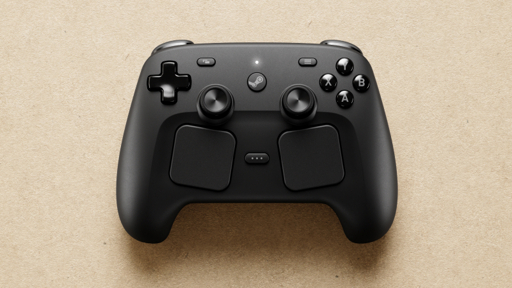
As a big fan of the Steam Deck something I want to emphasize here is that even if you didn’t want both the joysticks and the touchpads on the Steam Controller and wish they had picked one or the other, this kind of setup means the controller has essentially the same layout as the Steam Deck which is HUGE for ease of finding custom control schemes already uploaded by the community for complex games.
I prefer joysticks+gyro over touchpads for aiming and so for me the touchpads might seem superfluous, but in reality I heavily use them for virtual menus in all of my control schemes I make for complex games with lots of controls and inputs. The nice thing is that even though I am in the minority of people in that I prefer joysticks + gyro over touchpad for aiming, because the Steam Deck and Steam Controller both have two touchpads and two joysticks, somebody who is touchpad centric can use a control scheme I make pretty much right out of the box just by flip flopping the touchpad and joystick bindings so the virtual menus live on the joysticks instead.
I think this will be one of the subtle things people look back on and credit the Steam Deck and now new Steam Controller for having, it might seem silly and extraneous to have both touchpads and joysticks but it opens up a very wide range of capability and also makes it easier for touchpad and joystck focused players to share custom keybinding schemes with each other.
I thought I’d use the touch pads more but gyro is the first thing i set up in most games.
This is wild to me. Holding my arms perfectly still is practically impossible for me. The idea of a game using my pose and unconscious arm movements as input is positively gameplay-wrecking.
I have mine set so if I want it to stay still, I lift my thumb off the movement joystick, turning off the gyro control. If I still need to move, I nudge from the side where the sensor isn’t
You use both thumbsticks for identical movement control?
One is lateral movement, the other is aiming. My deck’s offline at the moment, so I’m going from memory… but now that I think about it, I’m pretty sure I have the right stick set to aim. Then I have the gyro set to only activate when my thumb is on the right stick. Big rapid changes in direction I use the stick and the fine adjustments don’t much matter; then for fine control I hold the stick still, with thumb on top, and physically shift the deck to aim. Sometimes bracing my wrists on my knees or whatever’s handy.
Then when I end up angled weird, I lift my thumb and settle back in. My play style tends to end up with me twisting around while I play anyway, this just lets me harness it a bit!
That sounds like too much cognitive load. Stick go left, guy go left.
Like I said, I tend to move like this regardless; this just lets it actually do something!
I play shooters and rts games with a gyro toggle, and I only toggle gyro off when I am putting my steam deck down or some other random thing. To each their own!
Super weird to me. I can’t imagine playing DOOM like that.
It is very effective for me, I can play multiplayer fps games against mouse and keyboard players fine and honestly I enjoy it more than mouse and keyboard, probably because I grew up playing xbox/consoles (not that I find it difficult to use a mouse and keyboard, just not as fun) but also because it just feels like I am aiming so snap shots and such are wayyyy more satisfying to me than if I just moved a mouse to click on them.
In practice it isn’t necessarily easy to tell I am using gyro except for when I do brief quick reaction shots just relying on gyro for aim, the rest of the time I don’t ever think about using the gyro consciously, I just use the joysticks for rough aim and let my brain figure the rest out with the gyro. Recoil in FPS games is also way more fun to control with gyro, it is a more direct control relationship rather than dragging a mouse down a mousepad, at least for me.
I don’t move the Steam Deck much though, it isn’t like I am getting a work out whipping the Steam Deck around, the gyro is really just there to lock in broad joystick movements to be accurate and on target consistently thus avoiding the small aim adjustment problem that joystick deadzones create. Also once I got used to it, my brain automatically cancels unintended gyro movements with joystick movements and thus I don’t have to hold the Steam Deck totally still in order not to have my aim utterly thrown off from a normal amount of arm shake/movement.
Sounds like lot more work than “move stick left, guy go left”
Same, I always have to disable it or greatly dial it back, for example in fallout nv I leave it on with low sensitivity while I’m holding the trigger to ads, so I can have the fun aiming experience when I want to, what I really can’t stand is “thumb on joystick activates gyro” MF I leave my thumb on the thimbstick when I want to use it, why would I want to trigger gyro?
The joysticks on the steam deck are touch sensitive and can bet set as the gyro aim activation you can also set it to be a combination of that + another button so aim down sight and finger on aim joy could activate it if you want or some other combination. Its slick as shit
A bit how, most of the time in Breath of the Wild, the gyros don’t do anything. They only activate while aiming a bow, using Magnesis or a few other context-sensitive moments. Because yeah, if it was constantly doing something like camera control that would get turned off immediately.
You say that because you prefer joysticks, but imagine using touchpad for camera movements and then going for buttons. Hella uncomfortable, something that was a plus in the old steam controller. Basically a downgrade.
I think the easy solution here is release an identical controller except switch the location of the touchpad and joysticks. I think this would also be good for people with all different kinds of hand shapes as someone who likes joysticks but has small hands might prefer the same controller as someone who has large hands and prefers touchpads and equal and opposite for the other version.
Idk it is a weird idea I guess but I think it makes a lot of sense if you think about it.
I agree, no way in hell we are getting it though lol.