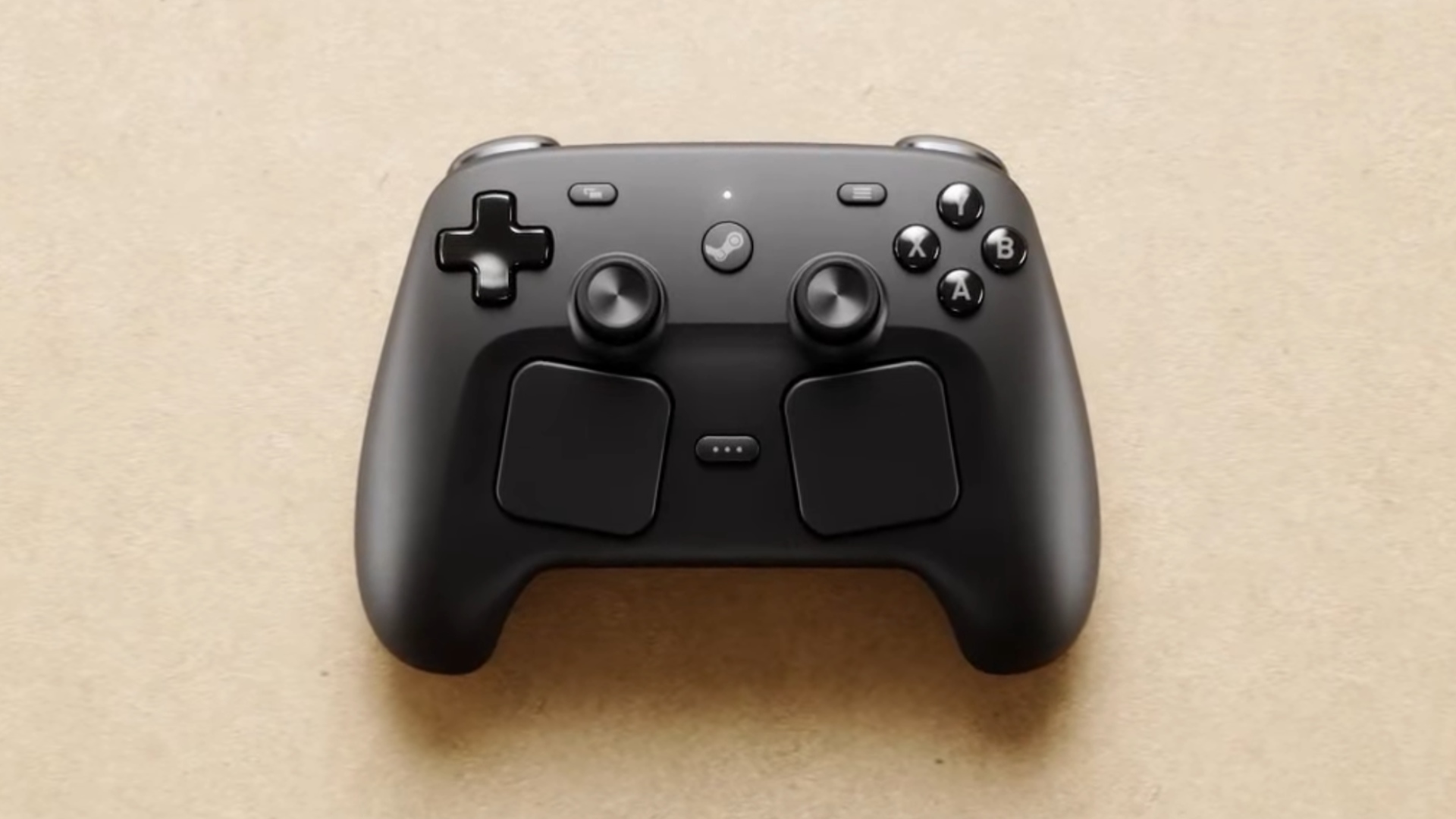
Leaker here is Brad Lynch, who generally seems reliable as a leaker for Valve software and products. He was also the source for the leaked renders of the steam controller.
deleted by creator
I have a setup with my Dualsense Edge (and Steam Deck) for FPS games where I use flick stick and gyro to aim, and swipe on the touchpad to switch weapons. It works disgustingly well. I play FPS games on controller now.
I’m too twitchy for gyro aim to be better than just using the sticks. My crosshair would just be jiggling all over 😔
Gross!
I have a bunch of nice controllers that all work on my gaming PC and Macs, etc.
But I’ll probally buy one of these too. I feel like it’s compulsory in a weird nagging way.
I guess worth noting for Steam newbies:
The trackpads can be configured to act as basically any possible kind of input.
You can break them down into 4 way buttons, 8 way buttons, 2 buttons, one button… make them work as a joystick, or as a mouse… they click in a bit at multiple points…
So, if you prefer a different kind of thumbstick orientation, you can basically emulate it.
Literally all of the buttons on one of these things can be reconfigured to do a whole bunch of crazy shit, you can make macros, you can make it so that a little hud popup with scrollable selectable options pop up, you can make combos of key presses do different specific inputs, you can make a turbo function… etc.
Hell, you can make the gyros act as a mouse/joystick input, in several different modes, maybe only when you hold the aim button down, if you want that.
Anything you run through Steam can be made to work this way with the Steam Input system they invented for with the Steam Deck, the Steam Controller 2.0 is basically a shrunk down Steam Deck without the PC and screen.
I don’t like fiddling with configuring a controller. On consoles it typically just works.
You’re allowed to not fiddle with it.
There is a system for official or community configurations, on a per game basis. Being able to customize that further, and easily, is the best of all words, and I very often wish one could do something similar on consoles.
The standard layout “just works” 99% of the time, the exact same as a console controller layout. All the fancy stuff is there if you want it, but very rarely required.
I really like how rotating the camera works on the track pad - the right track pad works as a right joystick, but crucially has momentum. So I could do a quick swipe on the pad and the camera would continue moving for a moment after. It also allows fine speed control by changing how quickly I swipe. Once I got used to it, I could make very quick and accurate orientation changes. Much better than joystick imo where you have to hold it down, using up your thumb for a second or two while you turn. As a bonus, the track pad also could be used as buttons so your thumb is already in position to get mashing again.
And the haptics feel fantastic, you can’t really judge it correctly without feeling it
I think they actually use a setup of basically … something like minature subwoofers, but I’m not 100% sure of that.
It’s voice coils all the way down, baby!
If they’re the same track pads as on the Steam Deck they don’t actually physically click in anywhere, but they have really good pressure sensitivity and can be configured to deliver a haptic feedback “click” back to your thumb when you press hard enough. It feels just like clicking a physical button, but it’s all a clever electronic illusion.
To test this on a Deck, try clicking with the unit switched off and keep trying as you hit the power button and it starts up.
The first generation of controllers clicks. Or at least it simulates clicking so much I don’t realise it isn’t, but I’m pretty sure it does
Ah, you’re correct!
It quite literally fooled me, but you are right.
To test this on a Deck, try clicking with the unit switched off and keep trying as you hit the power button and it starts up.
I genuinely thought my Deck had a defect when the trackpads didn’t click when it was asleep. Like I had somehow ruined the trackpads.
The haptic feedback is so god damn good, it fooled me.
this is the only controller than will retire my alpakka 1
this is the only controller that might retire my wavebird
I wish the alpakka 2’s kickstarted had exceeded. That would have been sweet
I want
Gimme gimme gimme
Just a note, as someone who owns a Stream controller ignore the sticks, it’s the pads you should be using.
Oh snap it’s got the Playstation joystick config… I kinda want this to replace my dying DS4 I’ve repaired a few times now. I wonder how easy it’ll be to reach over those pads and touch the sticks
to reach over those pads and touch the sticks
Plz stop
Huh???
Will pay a frankly humiliating amount of money to get one of these ASAP. My OG Steam Controller (my second, in fact) is on death’s door.
I hear you. I preloaded my Steam with 150cad. During the steam deck pre order the hold up when the website worked was payment processors.
Thanks for the reminder. I don’t think I encountered payment issues with the Deck (I used a credit card and was early enough to be in one of the April 2022 waves), but better safe than sorry.
I broke my first steam controller, and an old xbox controller, beating the final boss of Sekiro. My replacement is more-or-less a shelf ornament at the moment due to its irreplaceable nature. That old man’s got a lot to answer for.
I will also be at the front of the queue for this. Hesitation is defeat, after all.
Fortunately it doesn’t contain RAM or flash storage or a GPU, so you may not need to go to humiliation levels of money.
I’m waiting years for this, even longer than the Steam Deck exists! I think that I buy it twice, one to use it and the second one unpacked as a collectors item (plus as a backup). :-)
I want this controller, but I am so annoyed that no controller on the planet comes with separated directional buttons for the D-Pad. Accidental diagonal input is the bane of my existence. The Nintendo Switch Joy-Cons have separate buttons and I freaking love it! But the ONLY reason they did that is to allow them to serve as ABXY when held sideways. No “real” controller does this.
The only option I’ve found to achieve this is to get a PlayStation controller (PS4 or PS5), and mod it with a kit that separates the buttons under the faceplate. But the extra features of the Steam Controller sound too good to sacrifice just for that.
The only D-Pad I’ve ever actually liked is the 3DS (XL), because it’s so clicky and never caused accidental diagonal input. Seriously, how do people accept this crap?
So yeah, I really hope the D-Pad on this is clicky. I’ll probably be buying it either way.
I only accept it because I have become used to it.
Otherwise, I do tend to agree with you for the pretty rare time I need to not go accidental diagonal.
luckily the steam controller is very configurable. All the buttons can be remapped, with layers, for basically anything you could imagine. I have an OG steam controller that I use to play helldivers 2. The OG steam controller does not have a D pad at all, and D pad input is very important in that game. Normally you hold LB and then use the D pad to input stuff. So for the steam controller, I added a layer where when holding LB (and only when holding LB) the ABXY buttons become a D pad. So it’s ABXY or a D pad depending on the context and proper layers mean I don’t even have to think about it. I’m sure if the D pad on this one isn’t clicky enough, you could do something like that.
It’s an interesting thought, but no amount of software is going to conjure up new physical buttons. You pretty much always need to use the ABXY buttons at the same time as the D-pad, so this remapping trick wouldn’t be possible.
8bitdo d-pad is very clicky and defined
I mean, arguably… it isn’t a D Pad if its actually seperate buttons.
But anyway, with the Steam Deck, which the Steam Controller 2.0 is basically a scaled down version of, that doesn’t have the whole computer and screen… you can at least get after market uh… contact boards?
I’m not sure of the term, but like the internal platter board thing, that the dpad/abxy buttons actually physically connect to, with the trigger/switch mechanisms.
For my deck, I got a kit that replaces the original ones with ones that are much ‘clickier’, like a mechanical keyboard as compared to a membrane keyboard.
It has more tactile and also audio feedback, beyond just being more responsive… that was like $30 bucks or something?
For a while, it was the case that to do this kind of mod, you’d have to do your own solder, but I waited and eventually somebody in China somewhere started making ones that are pre-soldered, and just require an appropriate screw driver and some dexterity to install.
So… if the Steam Controller takes off, I’d say give it 6 months, and by then something similar will probably exist for it.
That’s a good idea actually!
In some use cases the 4 buttons instead of the D pad on the Joy Cons are amazing. As you say, you have no false diagonals. I really like them in Tetris for example.
But in 2D platformers or metroidvanias like Mario or Hollow Knight? Literally unplayable.
I don’t know what you mean, Hollow Knight is unplayable with accidental diagonals. Try attacking in mid-air while moving left, but then oops! Instead of an attack to your left, you do a pogo or an upwards attack. You miss your target, and you die.
After years of conditioning to play platformers with a D pad I just can’t play them with the Joy Cons. I played Hollow Knight with the 80BitDo SF30 Pro. Of course sometimes I died :D But I don’t blame the controller for that.
Interesting. I played Hollow Knight on Switch and joycons were my favorite option for this exact reason. The few times I tried with a Switch pro controller … did not go well. It’s too squishy, and I absolutely do blame the controller there! Presumably 8BitDo is much better and clickier.
Silksong I actually played on PC, with a keyboard. It was great for me, the biggest downside personally is the lack of rumble - I love haptic feedback. The game definitely plays better with a controller but the button layout on keyboard was totally playable.
Was about to recommend the same thing; I just couldn’t get anywhere on Silksong with a normal pad, had to set it up for a fight stick to have proper control.
Only got yourself to blame for diagonals with these bad boys:
https://www.8bitdo.com/arcade-controller-transparent-purple/
Of course, 8bitdo’s stuff is awesome, but Steam controllers are awesomer.
Xbox Series controller dpad is very clicky and well defined, so accidental diagonal inputs aren’t a concern with that one.
There’s likely a number of other similar clicky dpads on the market nowadays, it’s been popularised again with quite a few retro handhelds.
@Fubarberry I want one!
Hell yes.
That controller is the lynchpin for making a mini PC my future home theater center. I care for it more than the steam machine
I know you didn’t ask but i recommend looking into a rii mini keyboard with trackpad as well.
Got the Rii 4 recently to use with my Steam Deck since I got tired of my Roku I bought 6 years ago sending telemetry/statistics outbound (and getting blocked by my PiHole/router combo) that I unplugged it and threw it into a drawer. Excellent little piece of kit!
Look up the Logitech k400. All my home theaters have computers and they all have that keyboard hahaha
Same! It’s perfection.
I hear yeah, I want that Controller, its everything I asked for after using the Deck plus more. My Steam Account is preloaded with Money cause I remember when the Steam Deck went pre order the payment processing couldnt keep up. Frame is interesting. But probably way to expensive for the little interest I have.
Oh thank you for the heads up! I might add money myself for this.
Same. Its a perfect device for running an HTPC / living room gaming device. Im planning navigate through streaming options, kodi, steam remote play, moonlight, and a bunch of emulators all with the same controller.
Same. I desperately hope they release a version with the regular thumbstick layout instead of the PlayStation layout that’s on the Deck.
“Regular” thumbstick layout? PlayStation’s was first.

The PS1 controller was my first real PC controller btw, with an adapter! Back then it was such a blast to play emulation with such a great controller. As other PC controllers sucked for the most part.
It was kind of a pain to find a good controller for PC back in the day. It was nice when standard console controllers just worked with it.
- nobody else does it that way
- if we’re going with who’s thumbstick layout was first then it’s n64 and I think we agree nobody wants that
-
Wii, Wii U, and Steam Deck (soon Steam Controller) did it that way
-
N64 wasn’t dual analog, so not relevant since it wasn’t symmetrical or asymmetrical.
most people do it the other way
I’ll just include consoles that came with symmetrical or asymmetrical for simplicity’s sake:
Symmetrical:
PS2: 160 million
PS3: 87 million
PS4: 117 million
PS5: 92 million
Wii U: 14 million
Symmetrical total: 470 million
Asymmetrical:
Xbox: 24 million
Xbox 360: 84 million
Xbox One: 58 million
Xbox Series X: 35 million
Gamecube: 21 million
Switch: 155 million
Switch 2: 17 million
Asymmetrical total: 394 million
More people have played on symmetrical controllers than asymmetrical.
I prefer assymetrical xbox style for modern games where the analog stick is more important than dpad. For oldschool games I prefer the dpad on the outside (symmetrical) like Playstation does. Just my opinion.
hardly any of those are still in production by that logic a regular TV is a crt lol
Why would a single analog stick be relevant in a discussion of whether symmetrical or asymmetrical analog sticks are “regular”?
that’s not what the discussion is about
The layout was very very non standard and had a single stick. I’m smoking a lot of weed but I can tell you the n64 controller doesn’t count here.
I said it was first I didn’t say it was standard BUT I’m curious how something that’s literally the only one of it’s kind at the time of release was nonstandard lol
-
This controller was peak design. I was using a DS3 as my go to pc controller for years before the sticks died.
I keep rebuilding the same DS4 controller as it’s ideal as a PC controller, both wired and Bluetooth protocol. But it keeps breaking or wearing down on me and parts keep going up in price and the dang thing is getting beat up. I looked into the 8-bitdo controllers but I didn’t care for the only one they had with the DS layout, their retro one.
I’ll heavily consider the Steam Controller 2 if the price and quality is right.
I love every 8bitdo I own. The pro2 is great, aside from the Nintendo face button labels, it’s become my daily driver and dev controller.
I’m the opposite, Xbox button labels drive me crazy. I learned the layout on the SNES, so it’s hard for me to adjust. I’ve gotten better since playing more PC games on my Steam Deck since the XBox layout is the default, though I always choose PS button prompts if the game has the option.
Universal glyphs are better imo. In my head I call them north, south, east, west instead of a, b, x, y (I’m pretty sure that’s how the facebuttons are labeled in the Linux kernel, regardless of Xbox,Nintendo,ps)
What about a PS5 controller?
Roommate has one and I didn’t like the feel as much as the DS4 and the DS4 is cheaper than the DS5. But I had been considering the DS4 over the 8-bitdo, and this is so minor, but I liked that the DS controllers had the speaker compatibility with Death Stranding 1 and 2 to add some little sound effects to the game. Tho those are the only two games I’ve seen it work with on the PC so it’s so so minor.
The PlayStation controller is the same as a SNES controller, but with two sticks and finger grips.
Xbox took thier controller design from the Dreamcast. Which came out long after the SNES, and before the xbox.
switch and xbox do it the other way
What other way? The A and B buttons?
The sticks? I just explained to you why they have the layouts they do.